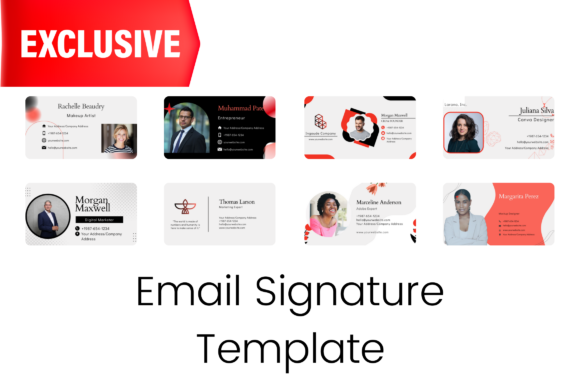
Editable Email Signature Templates for Pros
Your email signature is often the last thing a recipient sees before closing a message, yet it carries significant weight in how you are perceived. It acts as a digital business card, a branding opportunity, and a call to action all rolled into one small space. For many, creating this element from scratch feels daunting or time-consuming. This is where editable email signature templates become an invaluable resource. These pre-designed layouts allow anyone, regardless of technical skill, to craft a polished, professional footer that aligns with their personal or business brand.
The concept is simple: instead of wrestling with HTML code or struggling to align images in an email client, you start with a high-quality foundation. These templates are designed to be fully customizable, ensuring that the final result looks unique to you while maintaining structural integrity across different devices and email platforms.
Why Professional Presentation Matters
In a digital-first world, trust is built through details. A sloppy or non-existent signature can make an individual appear disorganized or transient. Conversely, a well-structured signature signals stability and attention to detail. However, the definition of "professional" varies depending on who is sending the email.
For a corporate executive, professionalism might mean a clean layout with a headshot, direct contact links, and a company logo. For a creative freelancer, it might involve a portfolio link, a vibrant color scheme, and social media icons that showcase their personality. Premium email signature templates cater to this diversity by offering a range of styles that can be adapted to fit specific industry standards without requiring a graphic design degree.
Tailoring the Tool to Your Role
Different users approach these templates with different priorities. Understanding how various groups utilize these resources can help you decide if they are the right fit for your workflow.
- Entrepreneurs and Small Business Owners: For this group, speed and brand consistency are paramount. They often wear multiple hats and cannot afford to spend hours designing minor assets. Using a template allows them to maintain a cohesive brand image across all communications instantly. They prioritize flexibility, needing to swap out logos or update phone numbers as their business evolves.
- Marketers and Content Creators: These individuals view the email signature as a conversion tool. Their focus is on engagement. They look for templates that offer prominent spaces for social media icons, links to latest blog posts, or banners for upcoming webinars. For them, the ability to easily resize elements and change colors to match campaign themes is crucial.
- Educators and Non-Profits: Clarity and accessibility are often the top priorities here. An educator might need a signature that clearly lists office hours, department information, and institutional logos. They value templates that are easy to read and print, ensuring that important contact information is never lost in a complex design.
- Freelancers and Consultants: Building authority is key for independent workers. A premium template helps them appear as established as a large agency. They often look for designs that highlight testimonials or specific service offerings, using the signature to reinforce their expertise with every email sent.
The Power of Editability in Canva
The true value of these templates lies in their ease of use. Built for Canva, a free and widely accessible online graphic design tool, these files remove the technical barriers associated with traditional email signature creation. You do not need to know coding languages like HTML or CSS. Instead, you work within a visual interface that feels intuitive and responsive.
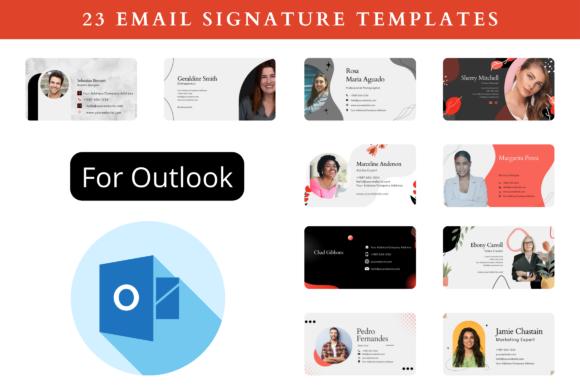
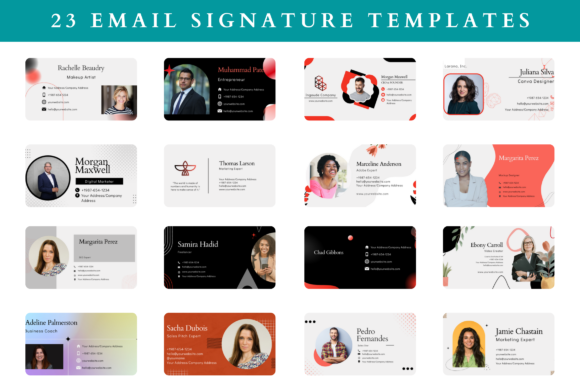
When you access the editable templates link, you are greeted with a collection of 23 distinct designs. Each one is crafted with a standard size of 400 x 200 pixels, which is optimal for email clients, but the beauty of vector-based design in Canva is that you can resize at any size without losing quality. Whether you need a compact version for mobile optimization or a larger banner for desktop viewing, the elements scale perfectly.
Customization goes deep. Every aspect of the template is under your control:
- Images: Swap placeholder photos for your own headshot or company logo instantly.
- Color: Match the hex codes to your exact brand guidelines.
- Font: Choose from thousands of Google Fonts integrated into Canva to match your typography preferences.
- Elements: Add or remove icons, lines, and shapes to suit your layout needs.
- Background Color: Adjust the BG color to ensure readability against dark or light email modes.
Practical Workflow and Download Benefits
Time is a finite resource, and efficiency is a universal goal. By utilizing pre-built structures, you save priceless time that can be better spent on core business activities or creative projects. The process is streamlined to get you from download to deployment in minutes.
Upon downloading the package, you receive more than just the design files. The inclusion of an Instructions PDF ensures that even beginners can navigate the editing process with confidence. This guide walks you through how to use the template, how to export correctly, and how to insert the final image into your email settings. Additionally, sample signatures are provided to inspire different layout configurations, showing you what is possible within the constraints of the design.
Once your design is finalized, the export options are versatile. You can download your signature in various formats including PNG, SVG, JPG, and PDF. PNG is generally recommended for email signatures due to its balance of quality and file size, supporting transparency which allows the signature to blend seamlessly with the email background. SVG offers scalability for high-resolution displays, while PDF is useful if you need a printable version of your contact card for physical handouts.
Evaluating Quality and Long-Term Use
When selecting a template, consider the long-term utility. A high-quality template is not just about looking good today; it is about remaining functional as your career progresses. Premium templates are designed with longevity in mind. The layouts are clean enough to avoid looking dated in a year, yet flexible enough to accommodate new social platforms or contact methods as they emerge.
For the hobbyist or consumer, the barrier to entry is low. Since Canva is free to use, the only investment is the time spent customizing. This democratizes design, allowing a student, a retiree volunteering for a cause, or a side-hustler to present themselves with the same level of polish as a Fortune 500 CEO. The focus shifts from "can I make this?" to "how do I want to be perceived?"
Ultimately, building brand authority and engaging with your audience starts with consistent communication. An email signature is a small touchpoint, but when executed well, it reinforces your identity with every interaction. By leveraging editable email signature templates, you ensure that your digital presence is always professional, on-brand, and ready to make a lasting impression. Whether you are closing a deal, sharing knowledge, or connecting with a friend, the right signature ensures you do so with style and clarity.