Creating a Dignified Funeral Announcement Invitation Without the Stress
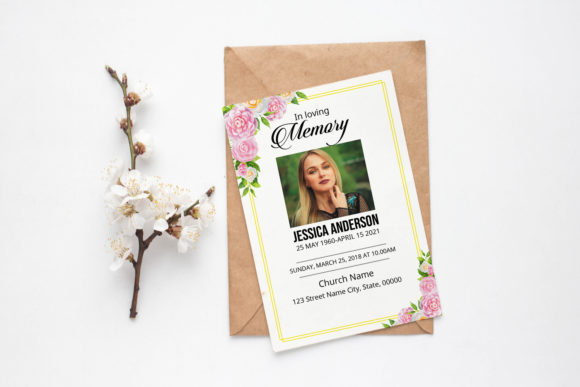
Losing a loved one is an emotionally draining experience, and the last thing anyone wants to worry about is the technical intricacies of design software while grieving. Yet, communicating the details of a service clearly and respectfully is essential. This is where a well-crafted Funeral Announcement Invitation becomes invaluable. It serves as the primary bridge between the family and the community, conveying not just the time and place, but the tone of the farewell. While many turn to professional designers, there is a growing trend toward using high-quality templates that allow families to maintain control over the message while ensuring a polished result.
However, navigating the world of digital templates, specifically those designed for Adobe Photoshop, can be tricky if you are unfamiliar with print specifications. A common misunderstanding is assuming that any image file found online will print correctly. This assumption often leads to blurry text, incorrect colors, or invitations that get cut off at the edges. By understanding the specific requirements of a professional template, you can avoid these pitfalls and create a tribute that honors your loved one with dignity.
The Hidden Complexities of Print-Ready Files
When you search for a Funeral Announcement Invitation template, you might see terms like "300 dpi," "CMYK," and "bleed." If you are new to graphic design, these terms can feel like jargon, but ignoring them is a mistake that directly impacts the physical quality of your invitation. One of the most frequent errors beginners make is downloading a template intended for web use (RGB color mode) and printing it for a funeral service. RGB is designed for screens, while printers use CMYK. If you print an RGB file, the colors often shift dramatically; a soft, mournful blue might turn into a harsh neon, or deep blacks may appear muddy gray.
Furthermore, resolution is non-negotiable. A template advertised at 300 dpi (dots per inch) is the industry standard for crisp, clear text. Many free resources offer files at 72 dpi, which looks fine on a phone but results in pixelated, unreadable text when printed on cardstock. Imagine handing out an invitation where the name of the deceased looks fuzzy or blocky. It detracts from the professionalism and respect the occasion demands. Always verify the resolution before downloading or purchasing. A true professional template, such as one sized at 4x6 inches, should explicitly state it is set to 300 dpi to ensure sharpness.
Understanding Bleed and Safe Zones
Another area where well-meaning individuals often stumble is the concept of "bleed." In the context of a Funeral Announcement Invitation, bleed refers to the extra area around the edge of the design that gets trimmed off after printing. A standard requirement is a 0.25-inch bleed. If your design background stops exactly at the edge of the 4x6 inch canvas, any slight movement during the cutting process at the print shop could leave a thin, unsightly white sliver on the side of your invitation.
To avoid this, your background image or color must extend past the cut line into the bleed area. Conversely, you must also be mindful of the "safe zone." Important text, such as the date, time, and location, should never be placed too close to the edge. If text sits within the bleed area, it risks being sliced off entirely. A practical approach is to keep all critical information at least a quarter-inch inward from the trim line. This ensures that no matter how the guillotine cutter aligns, your message remains intact and legible.
Navigating Software Compatibility and Fonts
Even with the correct file settings, software compatibility can pose challenges. Many templates are created in newer versions of Adobe Photoshop, but users often attempt to open them in older versions like CS5 or even alternative software that claims PSD compatibility. While a template may list "Photoshop CS5" as a minimum requirement, opening complex files in older iterations can sometimes cause layer effects or smart objects to flatten unexpectedly. This limits your ability to edit specific elements, such as changing the font color or swapping a photo without losing quality.
Typography is another critical element. A beautiful template is useless if you cannot replicate the fonts because you don't have them installed. Reputable template providers include a help file with direct download links for the specific fonts used in the design. Skipping this step and substituting a similar-looking font from your system often ruins the aesthetic balance. The spacing (kerning) and weight of the original font were chosen to complement the layout; a substitute can make the text look cramped or disjointed. Always take the extra five minutes to install the provided fonts before you begin editing.
Practical Steps for a Flawless Result
To ensure your Funeral Announcement Invitation meets the highest standards, follow a structured workflow that prioritizes accuracy over speed. Rushing the design process during a time of grief is understandable, but a methodical approach prevents costly reprints and delays.
- Verify File Specifications: Before you start, confirm the file is 4x6 inches, 300 dpi, and in CMYK mode. If you are unsure, check the image size settings in Photoshop immediately upon opening.
- Install Fonts First: Locate the help file included with your download. Install the fonts on your computer and restart Photoshop to ensure they appear in your font list.
- Respect the Bleed: When adding photos or background colors, drag them slightly beyond the edge of the canvas to cover the 0.25-inch bleed area. Do not crop them tightly to the border.
- Proofread Relentlessly: Typos in dates, times, or church names are devastating to discover after printing. Have at least two other people review the text against the original obituary or service details.
- Print a Test Copy: Never send the final file to a professional printer or run a large batch on your home printer without testing one copy first. Check the color accuracy and trim alignment.
Choosing the right template is about more than just aesthetics; it is about ensuring the technical foundation supports your emotional intent. A high-quality Funeral Announcement Invitation template provides the structure you need, allowing you to focus on the words that matter most. By paying attention to details like color modes, resolution, and bleed, you transform a digital file into a tangible keepsake that respects the memory of your loved one. Avoid the frustration of poor print results by treating the technical setup with the same care you give to the wording. With the right preparation, you can produce a dignified, professional announcement that brings comfort to all who receive it.